# Cell shortcuts!
**URL:** https://talk.observablehq.com/t/cell-shortcuts/2051
**Category:** Announcements
**Created:** [June 12, 2019, 10:14pm UTC](https://talk.observablehq.com/t/cell-shortcuts/2051 "2019-06-12T22:14:49Z")
**Posts on this page:** 17
**Page:** 1
### Author:  [@tom](https://talk.observablehq.com/u/tom)
#### Post date: [June 12, 2019, 10:14pm UTC](https://talk.observablehq.com/t/cell-shortcuts/2051/1 "2019-06-12T22:14:49Z")
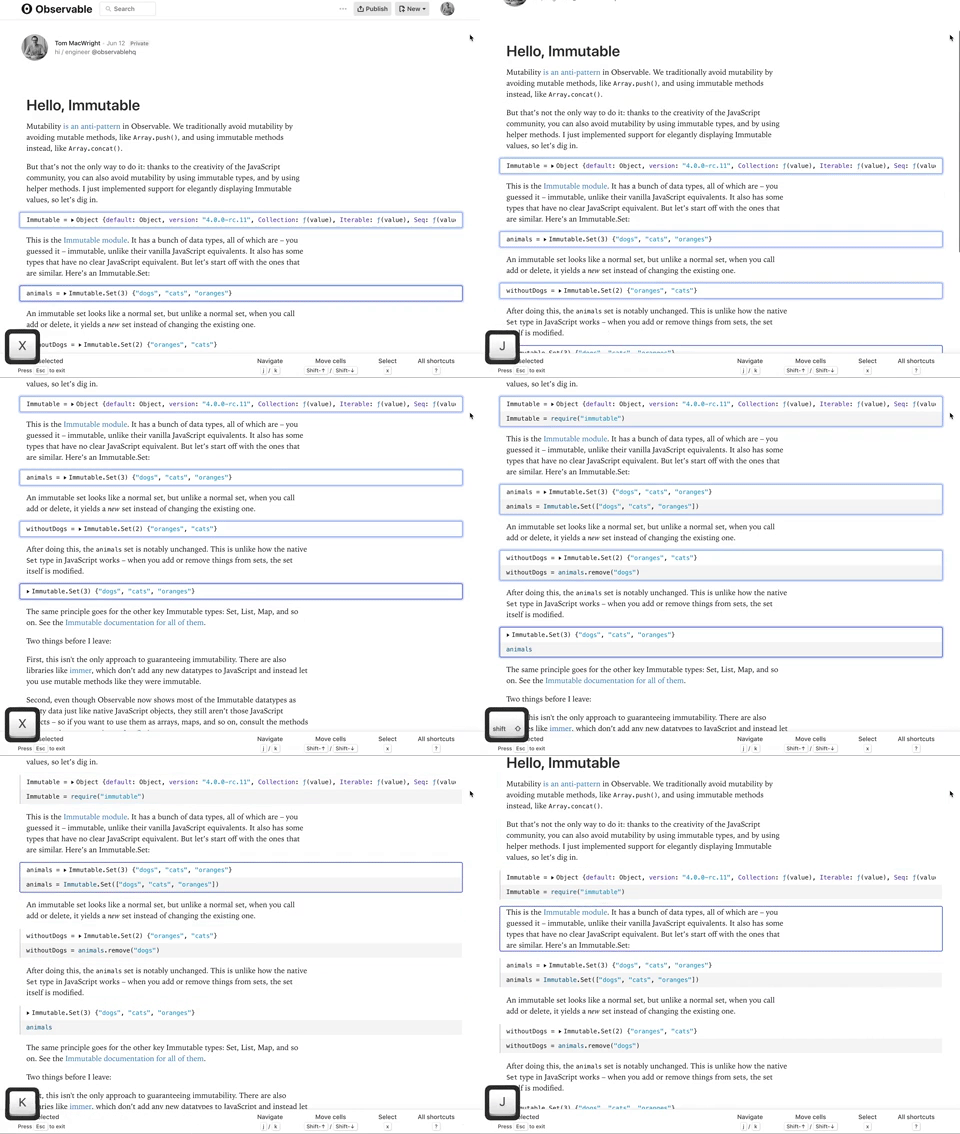
We just introduced new [cell shortcuts](https://observablehq.com/@observablehq/cell-shortcuts) on Observable - see all of them in the Keyboard Shortcuts reference: [https://observablehq.com/@observablehq/keyboard-shortcuts#cell](https://observablehq.com/@observablehq/keyboard-shortcuts#cell)
These add a bunch of keyboard-centric new abilities. You can navigate cells with j & k, select cells with x, delete multiple cells at the same time with Option-Delete, move cells with Shift Up/Down, pin or unpin multiple cells with Ctrl-Shift-P, and more. All of the commands that work with one cell in this mode work with multiple cells, making it pretty nifty for bigger notebooks.
These commands are a bit like vim’s normal & visual modes, and a bit like Jupyter’s command mode.
---
### Author:  [@bgchen](https://talk.observablehq.com/u/bgchen)
#### Post date: [June 12, 2019, 10:46pm UTC](https://talk.observablehq.com/t/cell-shortcuts/2051/2 "2019-06-12T22:46:21Z")
This is awesome! One minor annoyance: the nav bar at the top of the editor that becomes “sticky” when a notebook has to be reshared / republished can cover up the selected cell (it also frequently obscures the target cell when clicking on anchor links).
---
### Author:  [@bgchen](https://talk.observablehq.com/u/bgchen)
#### Post date: [June 12, 2019, 11:38pm UTC](https://talk.observablehq.com/t/cell-shortcuts/2051/3 "2019-06-12T23:38:42Z")
Another thing: the cell shortcuts stop working if the notebook iframe becomes focused, e.g. if you click the notebook and start pressing tab / shift+tab to go between links or input elements in the notebook. Maybe there isn’t a good way to have Observable’s shortcuts work in this situation, but the “X cells selected” footer can get in the way of the focused elements when navigating with the keyboard like that. Perhaps it can be hidden when the main editor frame loses focus?
---
### Author:  [@yurivish](https://talk.observablehq.com/u/yurivish)
#### Post date: [June 13, 2019, 1:19am UTC](https://talk.observablehq.com/t/cell-shortcuts/2051/4 "2019-06-13T01:19:02Z")
Neat, I’m looking around to exploring these! The multi-cell actions are a great addition. It seems that moving a cell down with cmd+shift+down causes it to lose focus, so you can’t move a cell down more than one step at a time, or edit it after moving it. Moving a cell _up_ works: [https://observablehq.com/d/561325582057ae64](https://observablehq.com/d/561325582057ae64)
---
### Author:  [@bgchen](https://talk.observablehq.com/u/bgchen)
#### Post date: [June 13, 2019, 1:25am UTC](https://talk.observablehq.com/t/cell-shortcuts/2051/5 "2019-06-13T01:25:28Z")
Interesting, the unfocusing seems to happen for me only in Chrome. I can move down multiple steps with the keyboard shortcut (for me cmd+alt+down) in both Firefox and Safari.
---
### Author:  [@bgchen](https://talk.observablehq.com/u/bgchen)
#### Post date: [June 13, 2019, 1:34am UTC](https://talk.observablehq.com/t/cell-shortcuts/2051/6 "2019-06-13T01:34:49Z")
Sorry for posting so many times in this thread, but I noticed another change which is bothering me. I used to be able to open an unpinned cell for editing and it would stay open temporarily when I pressed cmd+F to search on the page. Since this update, unpinned cells now immediately close when I try to search.
---
### Author:  [@yurivish](https://talk.observablehq.com/u/yurivish)
#### Post date: [June 13, 2019, 1:41am UTC](https://talk.observablehq.com/t/cell-shortcuts/2051/7 "2019-06-13T01:41:30Z")
Another nitpick – hope you don’t mind! – I noticed a few weeks ago that the scroll position tracks a cell as it is moved up and down. It would be great if this put the cell-in-motion in the _center_ of the screen, rather than at the edge of the screen. That way gives you some context to know where it’s moved to. As is, the edge behavior prevents you from seeing what’s directly above the cell.
And right now, another consequence of this is that the cell itself can disappear behind the header banner when you’re working in a shared notebook. (That banner also reduces the effective screen size, and I always unshare a notebook when doing serious editing because it makes it harder to work.)
**Edit:** I figured out another reason why the cell-following behavior was bothering me so – often I just want to move a cell out of the way, e.g. a definition like `log10 = Math.log10`. I’m in the middle of something, so I type it in and then move the cell down… But now the whole viewport shifts, and I lose my thought. If there was something like a “send to bottom” shortcut, or a way to move a cell down without following it…
---
### Author:  [@bchoatejr](https://talk.observablehq.com/u/bchoatejr)
#### Post date: [June 13, 2019, 2:56am UTC](https://talk.observablehq.com/t/cell-shortcuts/2051/8 "2019-06-13T02:56:37Z")
Multi cell selection is awesome. A couple comments:
On the keyboard shortcut page it says J is select above, K is below. I think they are backwards. Same with Shift-J/K.
I also have Chrome unfocus on Ctrl-Shift-Down, but ok in Firefox.
Thanks for the new features!
---
### Author:  [@tom](https://talk.observablehq.com/u/tom)
#### Post date: [June 13, 2019, 3:46am UTC](https://talk.observablehq.com/t/cell-shortcuts/2051/9 "2019-06-13T03:46:06Z")
Thanks for the feedback, folks! We’ve working on a fix to the focus management around J & K and I’ve swapped the accidentally-swapped J & K documentation.
---
### Author:  [@yurivish](https://talk.observablehq.com/u/yurivish)
#### Post date: [June 13, 2019, 6:43pm UTC](https://talk.observablehq.com/t/cell-shortcuts/2051/10 "2019-06-13T18:43:30Z")
I’ve noticed myself clicking on the output for a cell and then hitting ‘J’ to initiate a multiple selection that includes that cell, but right now this doesn’t work. It seems to me that the only way to select a cell using cell shortcuts is to first click into a cell, then press `Esc`. Is there some other way to start off a selection?
(Use case: I scrolled to a part of my notebook with a bunch of old cells that I want to remove)
Edit: I just noticed that if you select a cell and then shift+J a bunch, the selection expands upwards but the scroll doesn’t follow, so you can’t tell which cells you’re selecting.
Edit 2: It seems the currently active cell is also implicitly part of the selection; I ran into a case where I selected a bunch of cells, then moved the bright blue outline to the cell below them (which I didn’t want to delete), and then pressed Option+Backspace, which deleted all of the cells with the light blue outline but also the one with the dark blue (but not light blue) outline.
Edit 3: Aha, I see the difficulty with having the viewport follow the latest action – it might cause really large discontinuous jumps, if you e.g. start adding to both the top and bottom of the selection.
---
### Author:  [@tom](https://talk.observablehq.com/u/tom)
#### Post date: [June 13, 2019, 9:42pm UTC](https://talk.observablehq.com/t/cell-shortcuts/2051/12 "2019-06-13T21:42:42Z")
Are you sure that that problem is still around? We shipped a fix yesterday that should maintain the behavior where open cells stay open unless they’re closed explicitly or by hitting Escape. Maybe try refreshing the page?
---
### Author:  [@bgchen](https://talk.observablehq.com/u/bgchen)
#### Post date: [June 13, 2019, 9:54pm UTC](https://talk.observablehq.com/t/cell-shortcuts/2051/13 "2019-06-13T21:54:12Z")
Ah, you’re right! Sorry for the noise.
---
### Author:  [@bchoatejr](https://talk.observablehq.com/u/bchoatejr)
#### Post date: [June 13, 2019, 9:58pm UTC](https://talk.observablehq.com/t/cell-shortcuts/2051/14 "2019-06-13T21:58:44Z")
Ctrl-Shift-P opens an incognito window in Firefox and doesn’t unpin/pin cells when I’m in the Cell Select Mode. In Chrome it pins/unpins, but opens the print dialog also.
---
### Author:  [@tom](https://talk.observablehq.com/u/tom)
#### Post date: [June 13, 2019, 11:27pm UTC](https://talk.observablehq.com/t/cell-shortcuts/2051/15 "2019-06-13T23:27:27Z")
We’re considering switching the pin shortcut to just “p” and the delete shortcut to just “d” when you’re in this mode, so that there’s no chance of overlapping with Windows/macOS/Firefox/Chrome built-in keybindings, because there sure are a lot of them 😉
---
### Author:  [@mootari](https://talk.observablehq.com/u/mootari)
#### Post date: [June 14, 2019, 6:48am UTC](https://talk.observablehq.com/t/cell-shortcuts/2051/16 "2019-06-14T06:48:27Z")
> [@tom](#):
>
> because there sure are a lot of them
It might be time that web apps took on the same approach that many desktop applications have been following for years: Make hotkeys configurable. Not only are key combinations a rare commodity, but often the easy ones are already blocked by browser extensions or system-wide utilities.
Of course there’s the added complexity that a single user may access observable from a variety of systems and browsers (I know I do), so that configuration should probably be stored per browser (i.e. localStorage).
---
### Author:  [@tom](https://talk.observablehq.com/u/tom)
#### Post date: [June 14, 2019, 5:27pm UTC](https://talk.observablehq.com/t/cell-shortcuts/2051/17 "2019-06-14T17:27:17Z")
We’ve updated the pin & shortcuts as mentioned: they’re now `p` and `d`.
Configurable shortcuts might be something for down the line, but even then we want defaults that don’t conflict and feel right.
---
### Author:  [@erlebach](https://talk.observablehq.com/u/erlebach)
#### Post date: [April 11, 2021, 10:42pm UTC](https://talk.observablehq.com/t/cell-shortcuts/2051/18 "2021-04-11T22:42:56Z")
Hi,
What is the difficulty with deletion? I am interested in understand the rationale for not implementing something like in Jupyter. Click the top cell, shift click the bottom cell, and type X or something like that. I am sure it was considered, but what are the issues? You have a very powerful system at your disposal. It seems that there should be powerful tools to let keyboard wizards operate efficiently on their cells.
Another thing I’d like to do is copy/paste: select 10 cells near the bottom of my notebook, and paste them at the beginning. Again, that appers to be difficult.
Thank you. Gordon.